

Shannon AI Pentest Agent Installation and Hands-on Testing Guide (macOS/Linux)
I used 10 AI agents to attack my own website. Two hours later, they handed me a full security report. Shannon was more mature than I expected.
Why I Tried Shannon
AI has already started doing penetration testing on its own.
Vibe coding has been popular lately. People use Cursor / Claude Code / Gemini to build products in a few hours, then deploy them straight to Cloudflare / Vercel / Supabase. But there is one question people rarely bring up: do you really know whether your site is secure?
So I ran a fairly wild experiment: I handed my own website to the AI pentest agent framework Shannon and let it run recon, reverse the frontend bundle, trace APIs, validate vulnerabilities, and finally generate a complete penetration testing report automatically.
Test Environment
| Item | Details |
|---|---|
| Target | https://findtt.top |
| Stack | Cloudflare Pages / Cloudflare Functions / Supabase / Vue |
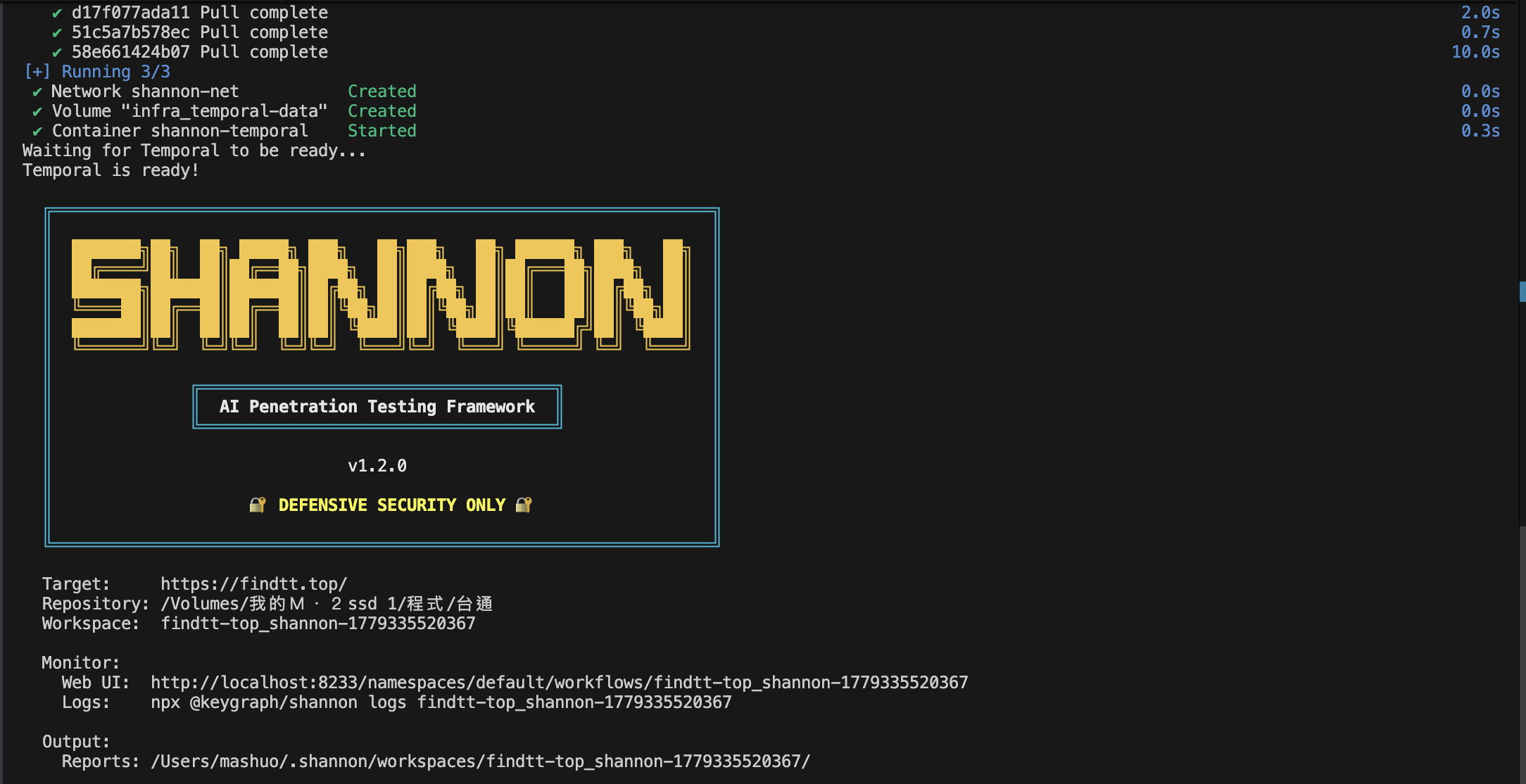
| Framework | Shannon v1.2.0 |
| Model | DeepSeek v4 Pro (via an Anthropic-compatible Base URL) |
| Agents | 10 |
| Duration | 128m 37s |
What Does Shannon Do? (Multi-agent Workflow)
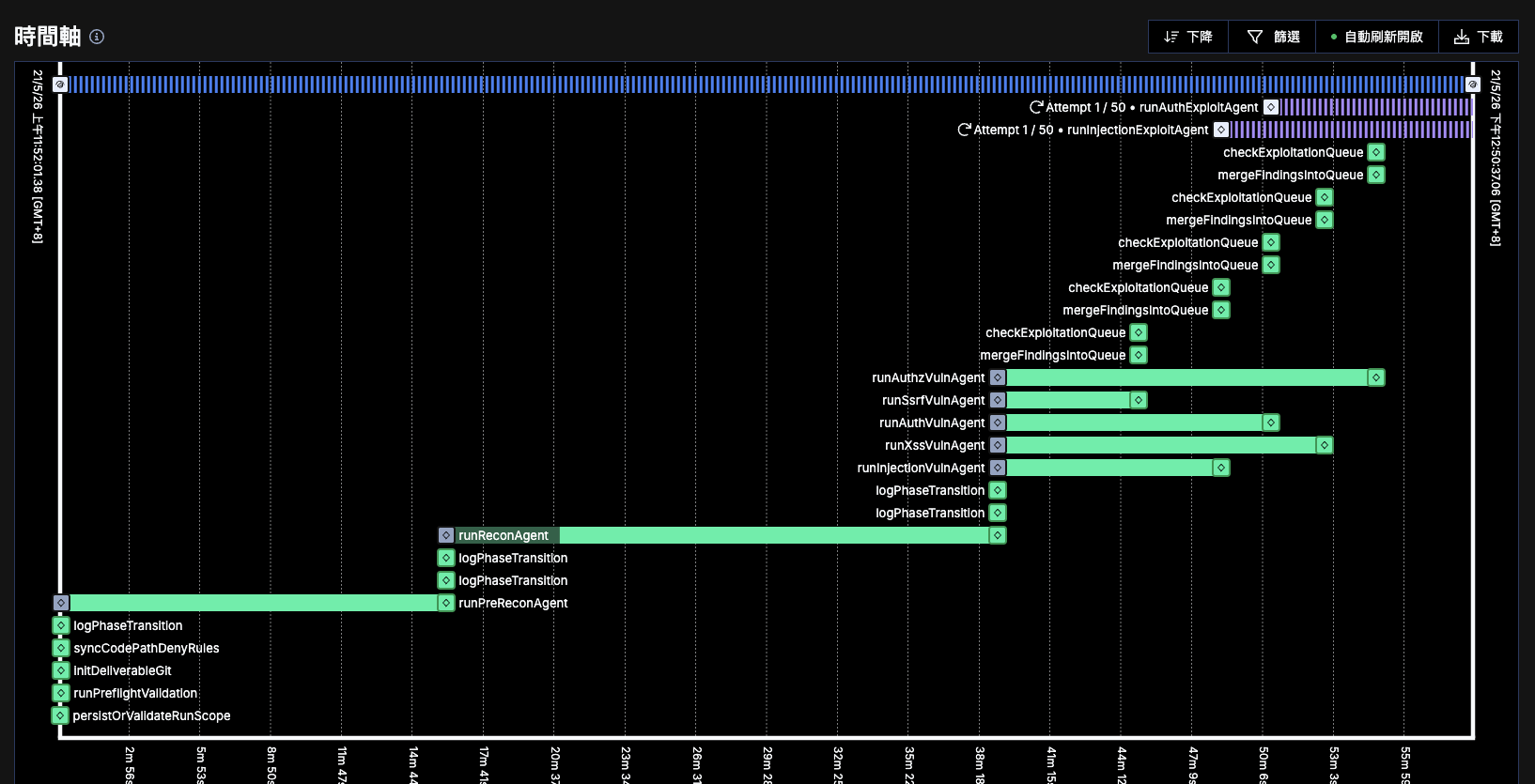
Shannon is not the kind of scanner that just “scans keywords → generates a report.” It is a multi-agent autonomous workflow, and each agent has its own context. It also validates exploits on its own.
- Pre-Recon: reads the repo, understands the framework, deployment method, API structure, auth flow, and even checks migrations / SQL / env usage and Supabase config
- Recon: reverses the JS bundle, finds API endpoints, traces request flows, and looks at the Cloudflare topology
- Vuln Analysis: runs five agents in parallel looking for clues around XSS / Auth / Authz / Injection / SSRF
- Exploit Validation: once it finds a lead, it tries to exploit it for real and filters out false positives
- Report: only keeps exploitable vulnerabilities in the report
What stood out is that it does not only test the frontend. It also directly:
- attacks the Supabase REST API
- tests CORS / anon key / auth boundaries
- attempts real exploitation
How the Temporal Timeline Felt
The part I felt most strongly this time was that Temporal is genuinely a good fit for AI agents.
This kind of workflow is naturally long-running, multi-agent, retry-heavy, and needs queue orchestration.
Watching the timeline felt like watching an AI SOC team work on its own.
Test Results
High risk: no server-side rate limiting at all
Low risk: some route parameters had path traversal issues, but the impact was limited
More surprisingly, it confirmed there was no:
- SSRF
- exploitable XSS
- SQL injection
- auth bypass
A lot of scanners spray out noisy findings, but Shannon validates false positives. I appreciate that part.
Cost and Time
| Metric | Value |
|---|---|
| Total Cost | $13.67 (CLI estimate, calculated using Claude pricing) |
| Agents | 10 completed |
In practice, I used a custom Base URL connected to DeepSeek, and the official displayed cost was around 1.15U. The gap was huge.
(Shannon estimates cost using Claude pricing. Actual cost varies depending on the model and proxy routing.)
Requirements (Docker Really Is Required)
Shannon uses Docker to run a prebuilt worker image. Even npx mode still requires Docker.
In practice, it will:
- pull an approximately 1GB worker image from Docker Hub
- run the full test inside a container
- mount your repo into the container as read-only
Minimum requirements:
- Docker Desktop (required)
- Node.js 18+ (npx)
- target URL must be reachable
- explicit authorization for both the test target and the codebase
Quick Start (White-box Testing)
Shannon is for white-box testing, so you must provide the repo path.
# One-time setup
npx @keygraph/shannon setup

# Start testing
npx @keygraph/shannon start -u https://your-app.com -r /abs/path/to/your-repo
You can use npx @keygraph/shannon logs <workspace> to check progress, or open http://localhost:8233 to view the Temporal UI.
If you are using a custom Base URL, such as proxying to a non-Claude model:
export ANTHROPIC_BASE_URL=https://your-proxy.example.com
export ANTHROPIC_AUTH_TOKEN=your-auth-token
Usage Notes
- Shannon will actively exploit vulnerabilities, so only run it in staging / sandbox environments
- You must have explicit authorization for the target system
- It only reports “exploitable” vulnerabilities; issues it cannot exploit are discarded
- The agent workflow can take a while, so reserve 1-2 hours
Personal Notes
After this run, it was the first time I felt that an AI security agent no longer feels like a toy.
Especially for indie hackers or small teams, the workflow of “deploy → hand it to AI for two hours → collect a report” is very practical.
But it also exposed a real issue: AI agents can easily over-dig.
At one point, it started recursive exploit validation, repeatedly merging findings and rerunning tests.
So if you want to use this long term, rules and boundaries matter: rate limits, scope limits, and vulnerability-type limits, for example.
My current takeaway is:
the future may become a standard workflow of “ship quickly → AI pentest → iterate and patch,”
while the human role becomes: define scope, interpret reports, patch, and verify.
Related Links: