

Antigravity Manager Setup Guide: Real-Time Monitoring for Multiple Accounts and Token Quotas
If you only care about two things: seeing quotas clearly and switching accounts quickly, Antigravity Manager is actually worth installing.
Why Did I Pay Attention to Antigravity Manager?
In my own daily use, I mostly rely on the basic features, though I do occasionally turn on the more advanced agent functions:
- Check remaining tokens / quota
- Quickly switch between available accounts
Just these two features are already enough for everyday use.
Interface Demo
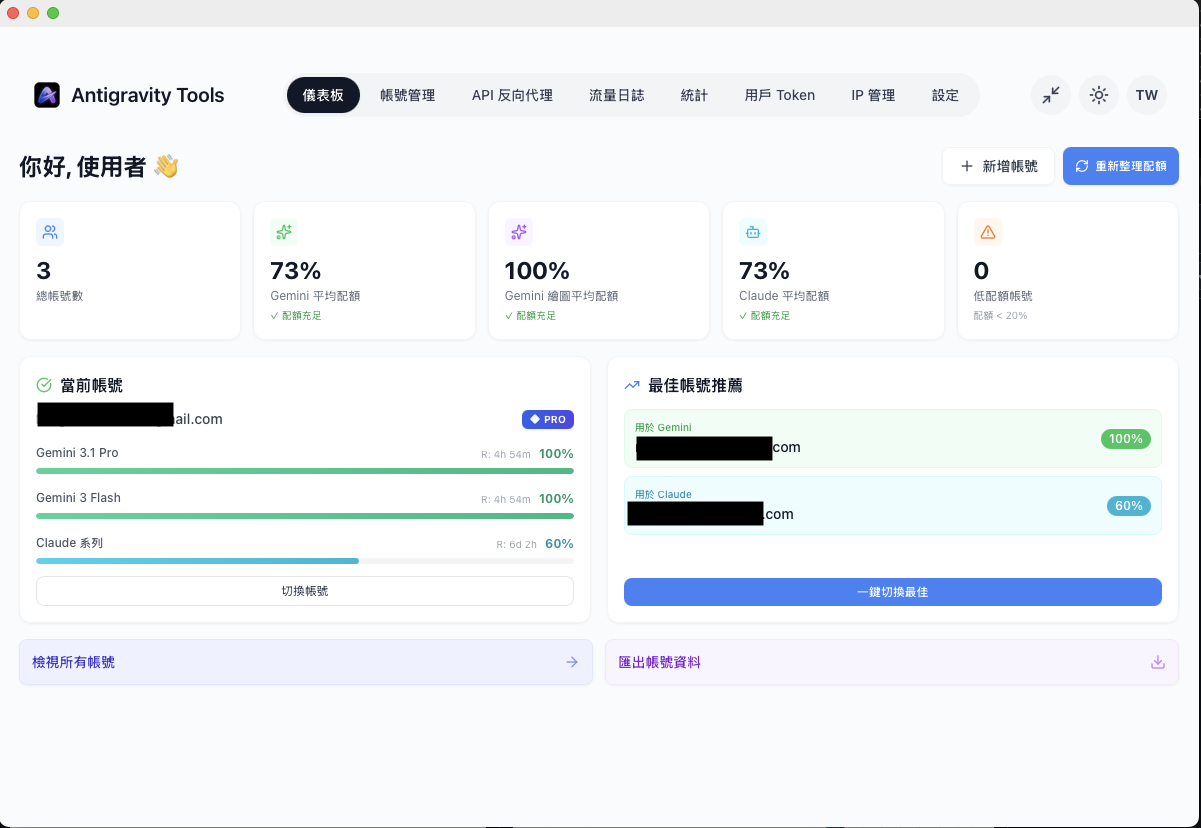
The 2 Core Features You Need Most
1. Check Quotas (Dashboard)
On the main screen, you can directly see each account's remaining quota, health status, and sync time.
Compared with only finding out whether an account has hit its limit after testing it each time, this kind of visualization really saves a lot of time.

2. Quick Switching (Account Switch)
When an account is low on quota or runs into risk restrictions, you can switch directly to the next available account.
You do not have to manually change a bunch of settings, and this becomes very noticeable when you use it frequently.

Installation Method (Quick Version)
macOS / Linux
curl -fsSL https://raw.githubusercontent.com/lbjlaq/Antigravity-Manager/v4.1.33/install.sh | bash
Windows (PowerShell)
irm https://raw.githubusercontent.com/lbjlaq/Antigravity-Manager/main/install.ps1 | iex
Actual Usage Flow (Very Short Version)
- Add your account. OAuth and token both work.
- Check the Dashboard to see which account has healthy quota.
- Switch the active account with one click when needed.
- Keep working without interrupting your flow.
Advanced Usage (You Will Definitely Need This If You Use Multiple Accounts or Multiple Tools)
Once you are comfortable with the basic features, these advanced points start to make a bigger difference.
1. Use It as a Local API Gateway to Unify All Your Clients
You can point your commonly used tools to the same local entry point, so each tool does not need to manage its own upstream configuration.
export ANTHROPIC_API_KEY="sk-antigravity"
export ANTHROPIC_BASE_URL="http://127.0.0.1:8045"
After that, you only need to switch accounts inside Antigravity Manager. External clients usually do not need to be changed back and forth.
2. Protocol Conversion: Lower Migration and Integration Costs
Many existing tools only support a single protocol. By using Manager for protocol conversion, they can be connected to your existing workflow more quickly.
Simply put: the upstream side may change, but your entry point can stay as stable as possible.
3. Model Routing and Fallback Strategy
In practice, the worst part is not "slow"; it is "getting interrupted halfway through the work."
If you have multiple models and multiple account tiers, routing and fallback settings can greatly reduce downtime caused by failed requests.
4. Docker / Server Deployment (Very Practical for Teams)
If you want to run the service on a NAS or always-on machine, you can consider container deployment and turn it into a shared scheduling entry point for your team.
docker run -d --name antigravity-manager \
  -p 8045:8045 \
  -e API_KEY=sk-your-api-key \
  -v ~/.antigravity_tools:/root/.antigravity_tools \
  lbjlaq/antigravity-manager:latest
5. My Practical Debugging Order
- First check the quota and sync time on the Dashboard.
- Check whether the current active account is restricted.
- Switch to a healthy account and retry first.
- If it still does not work, then check the routing rules and upstream response codes.
Usage Notes (Important)
- First get comfortable with "checking quotas + switching accounts"; turn on advanced agent features only when you need them.
- Remember to sync quota data regularly to avoid judgment gaps.
- You still need to pay attention to platform terms and account risk.
My Subjective Take
If, like me, what you care about most is "seeing quotas clearly" and "switching accounts fast enough," then Antigravity Manager is well worth installing.
Get the most out of these two basic features first, and the efficiency improvement will be obvious.
Related Links:
This article is based on my own notes and hands-on testing. Features and versions change quickly, so please refer to the latest official information.