

Marker Hands-on: Is It Easier Than MinerU for PDF-to-Markdown?
I tested Marker’s fast mode on an Apple Silicon Mac. It is already useful for ordinary text-based PDFs, but equations and tables can still fail. I also explain where it fits next to MinerU.
Introduction
I have used MinerU before, and I came away impressed by how well it handles complicated layouts, tables, and equations. This time I wanted to try Marker, another open-source PDF-to-Markdown tool whose everyday workflow feels more direct.
After this run, I think Marker’s fast mode is good enough when the file is not an especially complicated paper, but an ordinary text-based PDF, document, exported slide deck, or report. I would turn it into Markdown for reading, summarizing, or feeding into my own AI workflow. It is not a “convert it and never check it” tool, though: equations and tables can still break. For those files I would still reach for MinerU first, or switch Marker to balanced and trade more time for better output.
What is running in the video?
In the video, I use the PDF of the Transformer paper and ask Marker to process pages 3 through 8. Those pages contain two-column text, architecture diagrams, mathematical equations, and two tables. It is not the hardest possible scanned document, but it is enough to show whether the tool can cope with a paper.
I ran fast, not the higher-quality balanced mode:
time marker_single input/attention-is-all-you-need.pdf \
  --page_range '2-7' \
  --mode fast \
  --output_dir output/video-demo-fast
Marker numbers pages from zero, so 2-7 maps to pages 3 through 8 in the PDF. After it finished, I opened the generated .md file directly. The second half of the video shows the raw fast-mode output, with no manual cleanup.
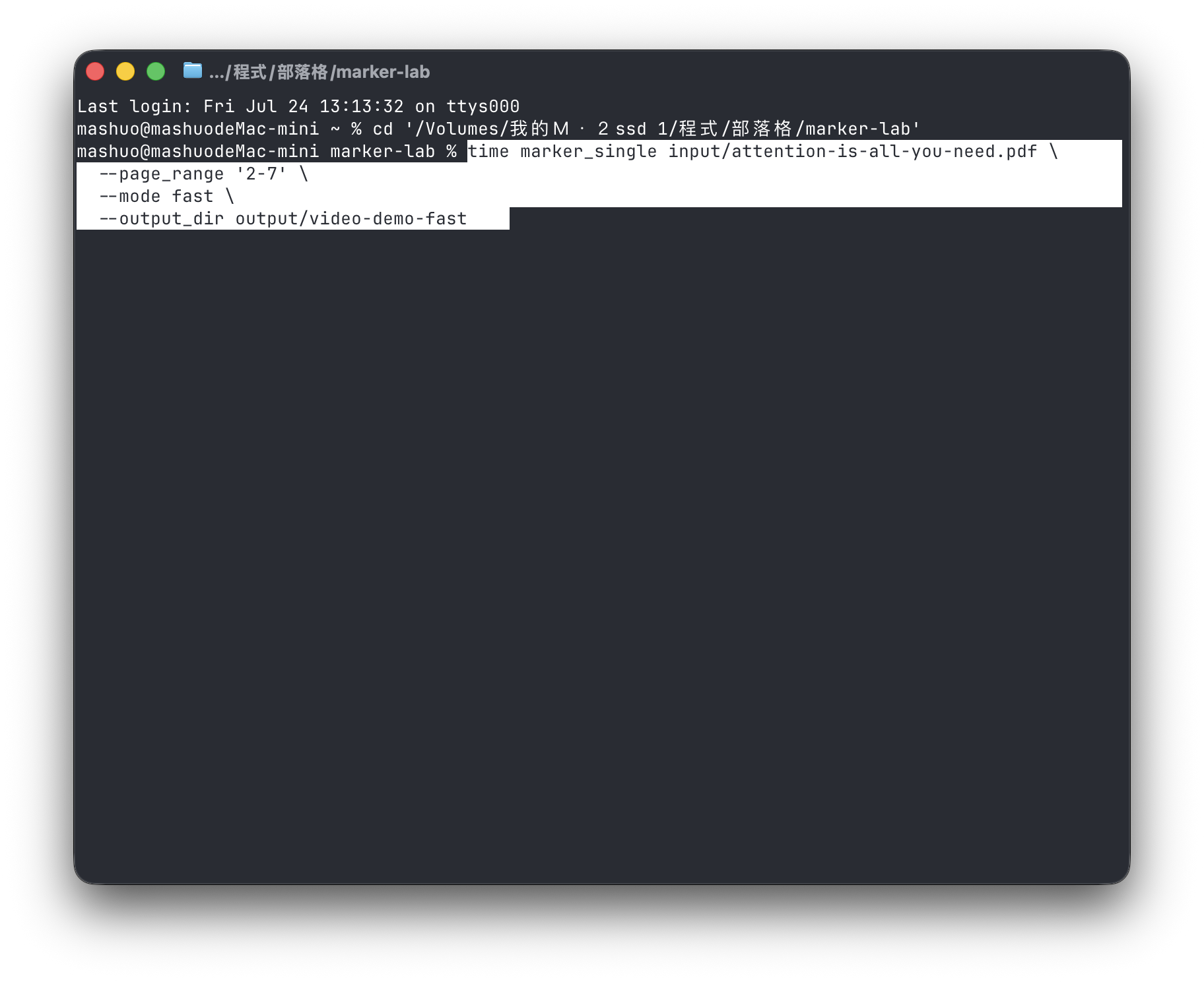
This is the command I used for fast mode before opening the generated Markdown directly.
On its first run, Marker downloads the Surya models and starts a local inference service. That added a little over a minute in my test; once the models are cached, they do not need to be downloaded again. The Hugging Face HF_TOKEN warning in the terminal is not a quality warning. It only says that unauthenticated downloads have lower rate limits, so it does not reduce PDF-conversion quality. Once the models are cached, it normally has no practical effect.
Is fast-mode output actually good?
For this output, I would call it “very useful for ordinary PDFs, but technical papers need proofreading.”
When I opened the generated Markdown, plain text, reading order, headings, images, and image captions were mostly preserved. Six pages took about 28 seconds on my Apple M4. For my own use case—making a PDF searchable and then reading it or passing it to an LLM—that result is already practical.
I would not call it perfect, though. The equations were detected, but not always correctly. One Multi-Head Attention equation rendered the final W^O as W^Q. The table failures were more obvious: columns, numbers, and formula fragments in Table 1 and Table 2 were split apart. If the output will be used for research, a database, or a formal quotation, a quick visual scan is not enough.
For a file like this, I would still start with fast for ordinary documents, text-based PDFs, and internal notes. Once a paper has many equations, tables, complex columns, or scanned pages, I assume the output needs review; I would not treat the Markdown as a lossless copy of the source PDF.
What is the difference between fast and balanced?
Marker currently has fast and balanced modes. This Apple Silicon Mac defaulted to fast: it tries to use the PDF’s text layer and calls visual models only when needed. balanced uses more VLM layout analysis and OCR, including a further pass over inline math.
I also ran balanced on the same six-page PDF:
| Mode | Wall-clock time on my M4 | What I saw |
|---|---|---|
fast | About 28 seconds | Useful text; equation and table mistakes remain |
balanced | About 3 minutes 14 seconds | More equations became LaTeX and both tables were noticeably more complete, though a few equation formats were still awkward |
I did not run a large benchmark across many documents; this is simply the result from the same PDF on the same Mac. But the difference was clear: when I want to read the content quickly, I use fast; when the tables and equations matter, I let balanced run for a few more minutes and compare it with the source PDF.
Is Marker easier to install than MinerU?
I think its overall workflow is easier to get started with, but it is not completely frictionless.
On my Apple Silicon Mac, the main setup was installing llama.cpp and then installing Marker with uv:
brew install llama.cpp
uv tool install --python 3.12 marker-pdf
In my use, the command I type most is simply marker_single <file path> --mode fast --output_dir <output folder>. For developers who are already comfortable opening a terminal and working with paths, it feels straightforward, without many backend decisions to make first.
Regular users still need to get through a few small hurdles: Homebrew, Python or uv, the first model download, and basic terminal paths. It is not a three-tap mobile app. But compared with learning several inference backends, models, and hardware configurations, Marker is easier to get to a first result with.
MinerU’s basic installation command is not long either, and its official project supports macOS, Windows, and Linux. It offers more paths, though: pipeline, VLM, and HTTP-client backends. That richer feature set also means more choices. Its documentation lists at least 16GB of RAM and 20GB of disk space for the local pipeline, while VLM use can involve a GPU or a remote model service. That is valuable for a long-term document-processing workflow, but the learning curve is higher the first time around.
Which one would I choose: Marker or MinerU?
This is how I would split the work:
| Situation | What I would try first |
|---|---|
| Ordinary digital PDFs, articles, and reports that I want in Markdown quickly | Marker fast |
| A quick local test and I am already comfortable with a CLI | Marker |
| Papers where equations, tables, and layout matter | MinerU, or at least Marker balanced followed by comparison with the source |
| Scans, complicated layouts, or a need to preserve structure as much as possible | MinerU |
| APIs, batch workflows, and many document formats | MinerU has more complete options |
MinerU currently puts PDFs, images, DOCX, PPTX, and XLSX into one parsing workflow, with Markdown, JSON, and auxiliary quality-inspection files as outputs. Marker can also handle multiple document types, but what stood out to me here was how simple it made the first step: turning a PDF into Markdown in the fastest mode.
If I am judging layout quality alone, I still think MinerU is better, especially for complicated papers and tables. This is not a fair head-to-head rerun with both tools on the same machine, version, and settings. My MinerU comments come from prior hands-on use and the current official documentation. Marker’s role is still very clear to me: it may not be the highest-quality option, but it gets you started quickly, and its result for ordinary PDFs is already useful.