

SuperCmd Open-Source Mac Quick Launcher: Install & Custom Command Setup Guide
Raycast extensions, voice dictation, and an AI assistant rolled into one open-source tool — could this be your new daily driver?
Introduction
If you're a heavy Mac user like me, you've definitely heard of Raycast. But today I want to talk about its strong contender: SuperCmd.
SuperCmd is an open-source launcher built specifically for macOS, and it's ambitious — it tries to bundle Raycast's extension ecosystem, Wispr Flow's voice dictation, Speechify's text-to-speech, and an AI assistant all into a single tool. Best of all, it's fully open-source.
UI Demo
Here's a live demo video I recorded, mainly showing the clipboard manager and voice playback:
SuperCmd clipboard and voice features in action
Installation Guide
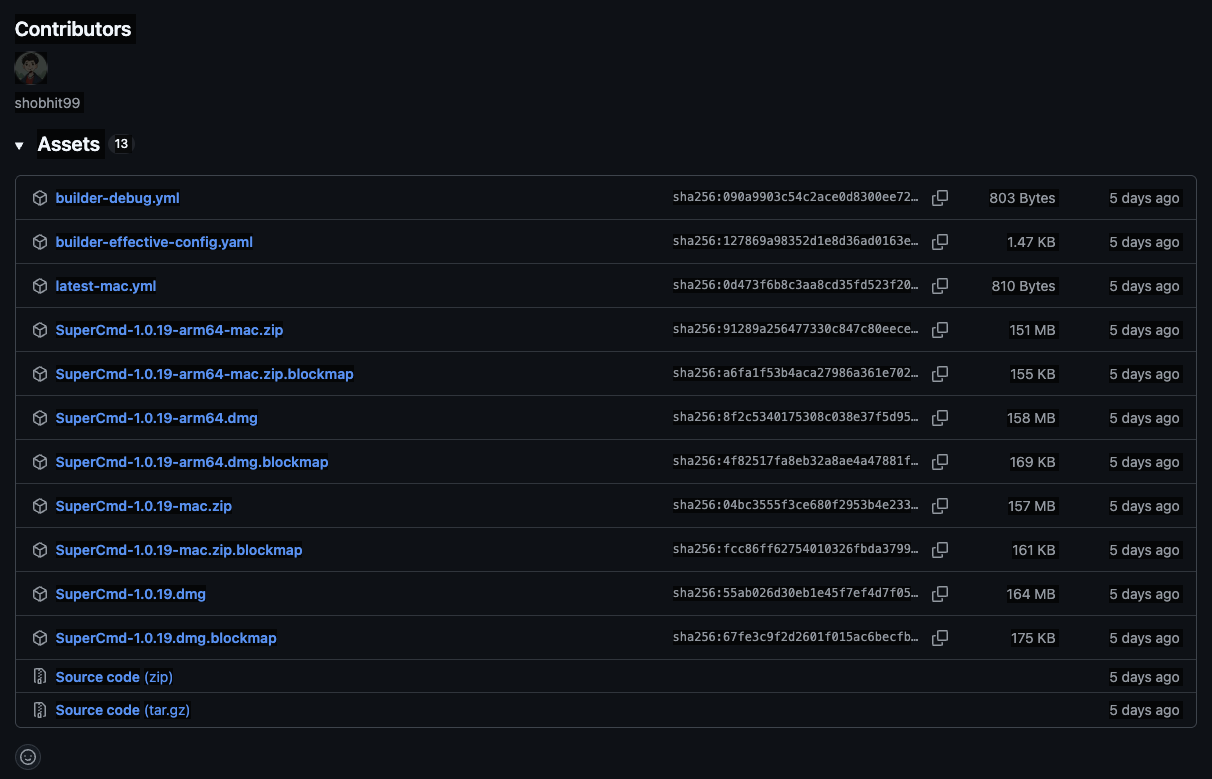
SuperCmd primarily publishes releases through GitHub. Pick the right build for your Mac chip.
Step 1: Download & Install
- Head over to the SuperCmd GitHub Releases page.
- Download the correct file for your chip:
- Apple Silicon (M1/M2/M3/M4): Download
SuperCmd-x.x.x-arm64.dmg. - Intel Mac: Download
SuperCmd-x.x.x.dmg.
- Apple Silicon (M1/M2/M3/M4): Download
- Open the
.dmgfile and drag the SuperCmd icon into the Applications folder.
Note: The first time you open it, macOS may show an "unidentified developer" warning. Go to System Settings > Privacy & Security and click Open Anyway.
Step 2: Grant Required Permissions
To unlock SuperCmd's full features, you'll need to grant the following permissions (the app will prompt you on first launch):
| Permission | Why it's needed | Features affected |
|---|---|---|
| Accessibility | Window management and simulating keystrokes | Window snapping, Snippet auto-completion |
| Input Monitoring | Detecting global hotkeys | Invoking the launcher, Hold-to-speak |
| Microphone | Speech-to-text | Voice dictation (optional) |
| Automation | Accessing selected text | Automation for extensions |
Tip: Restart the app after granting permissions to make sure everything takes effect.
Key Highlights
1. Works with Raycast Extensions
This is the most impressive part to me. The developer did a great job — SuperCmd can run Raycast extensions directly. If you're already used to the Raycast workflow, the switching cost is minimal.
2. All-in-One Feature Set
SuperCmd is more than just a launcher. It also bundles:
- Clipboard History: This is my most-used feature, and it's snappy.
- Dictation: Similar to Wispr Flow — hold a key, speak, and it transcribes.
- Text-to-Speech: High-quality voices similar to Speechify, plus you can plug in your own ElevenLabs API key.
- AI Assistant: Supports OpenAI, Anthropic, Gemini, and local models via Ollama.
Honest Hands-On Impressions
I've been using this tool for a while. Here's my real take:
| Feature | Thoughts |
|---|---|
| Clipboard | Great! Fast and intuitive. It's my daily driver now. |
| Dictation | Not great for Chinese yet. If you're hoping it'll replace Wispr Flow for Chinese input, you might want to wait. |
| TTS | Decent, though macOS already has built-in text-to-speech, so this is more of a nice bonus. |
| AI | I personally don't use AI inside launchers much, so I can't say too much here. |
Random thought: SuperCmd bundles Raycast + Cobe + Speechify features together, which is really appealing if you're on a budget or prefer open-source tools. That said, I still find myself gravitating toward Raycast's overall UI polish, honestly XD
Privacy & Security
For a launcher, security matters. SuperCmd is open-source, so you can audit the code anytime.
- Voice Data: STT runs entirely locally via Whisper — audio never leaves your machine.
- Telemetry: Only anonymous events (e.g., app launches) are sent for usage statistics.
Verdict: Worth It?
If you're looking for a free, open-source, feature-packed Raycast alternative, SuperCmd is absolutely worth a try. Especially if clipboard management and voice features are high on your list, and you can live with the current rough edges around Chinese dictation.
Links:
This article reflects my personal experience. The tool evolves quickly — check GitHub for the latest info.