

Codebase Memory MCP Hands-On: Turning Your Repository into a Queryable Knowledge Graph for AI Agents
Codebase Memory MCP is a local code intelligence engine that turns a repository into a knowledge graph for AI coding agents. This hands-on guide covers installation, indexing, the 3D Graph UI, and practical CLI queries.
Introduction
If you use AI coding agents seriously, you eventually run into the same problem:
The agent can write code, but it does not always truly understand the shape of your codebase.
It can grep for strings, read a few files, and infer from whatever context you provide. But as a project grows, that workflow quickly becomes a loop of searching, opening files, guessing relationships, and missing important structure.
Codebase Memory MCP is designed to solve exactly that.
It runs locally, parses your repository, and turns it into a persistent knowledge graph containing functions, classes, imports, call chains, HTTP routes, cross-service links, and more. Then it exposes that graph to AI agents through MCP.
In practice, this means agents such as Claude Code, Codex, Cursor, Gemini CLI, and VS Code can ask structural questions:
- Who calls this function?
- What does this method call?
- What are the main modules in this project?
- Which routes exist?
- What might be affected by this change?
After testing it on my own blog repository, the most important shift was clear: codebase discovery stops being file hunting and starts becoming graph querying.
Hands-On Demo
For this test, I indexed my own tech-blog repository and opened the built-in 3D graph visualization. In the demo, I drag and zoom through the graph to inspect how files, modules, and symbols are connected.
The indexing result for this repository:
- Files discovered: 326
- Graph nodes: 3995
- Graph edges: 8243
- UI URL:
http://localhost:9749
This is not just a pretty visualization. The same graph can be queried through MCP tools and the CLI for architecture summaries, function traces, code snippets, semantic search, and Cypher-like queries.
What Is Codebase Memory MCP?
The project describes itself as a code intelligence engine for AI coding agents.
The workflow is roughly:
- Parse the repository with tree-sitter
- Extract symbols such as functions, classes, modules, routes, and imports
- Store the graph locally in SQLite
- Expose the graph through MCP tools
- Optionally show the result in a browser-based 3D graph UI
According to the official README, it supports 158 languages and includes Hybrid LSP semantic type resolution for Python, TypeScript, JavaScript, PHP, C#, Go, C, C++, Java, Kotlin, and Rust.
It is also not a cloud service. No API key is required, Docker is not required, and the index is stored locally under ~/.cache/codebase-memory-mcp/.
That matters for private repositories. Your codebase does not need to leave your machine.
Why This Is Different from Grep
A normal agent often starts code discovery like this:
grep -R "ProcessOrder" .
Then it opens files one by one and tries to infer the real call relationships.
Codebase Memory MCP works differently. It builds a structural graph first, so an agent can ask:
codebase-memory-mcp cli trace_path '{"function_name":"ProcessOrder","direction":"inbound"}'
That is not asking “where does this string appear?” It is asking “who actually calls this function?”
On larger repositories, that distinction is huge. String search finds comments, docs, fixtures, tests, and unrelated identifiers. Graph queries stay much closer to the actual program structure.
Installation
On macOS and Linux, the official install command is:
curl -fsSL https://raw.githubusercontent.com/DeusData/codebase-memory-mcp/main/install.sh | bash
If you want the 3D Graph UI, install the UI variant:
curl -fsSL https://raw.githubusercontent.com/DeusData/codebase-memory-mcp/main/install.sh | bash -s -- --ui
In my test, the installer automatically detected and configured several local agents, including:
- Claude Code
- Codex CLI
- Gemini CLI
- OpenCode
- VS Code
- Cursor
- Kiro
After installation, check the binary:
codebase-memory-mcp --version
Launching the 3D Graph UI
If you installed the UI variant, start it with:
codebase-memory-mcp --ui=true --port=9749
Then open:
http://localhost:9749
The UI first shows indexed projects.
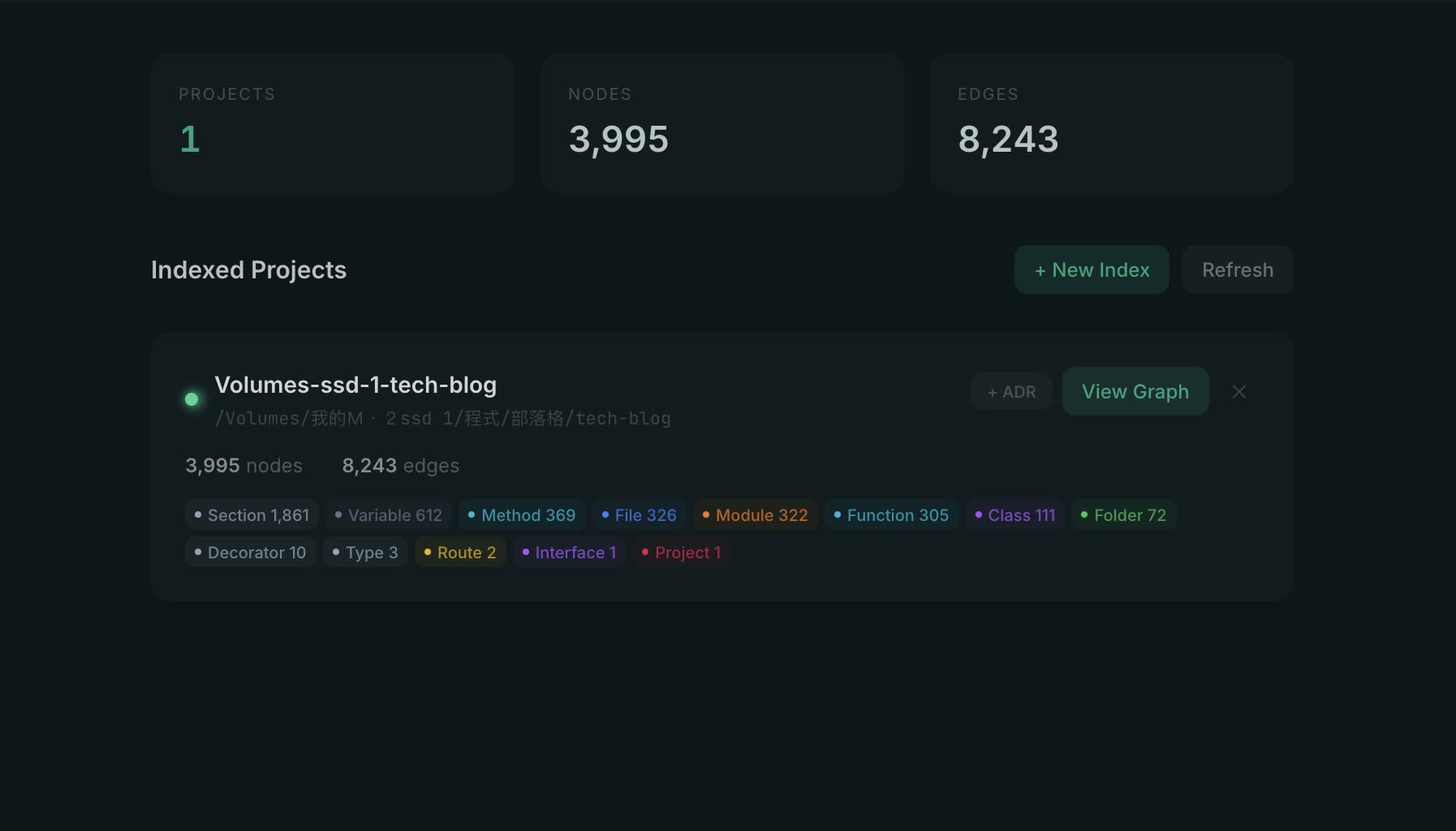
The Projects page lists indexed repositories, node counts, and edge counts
Click View Graph to open the 3D visualization.
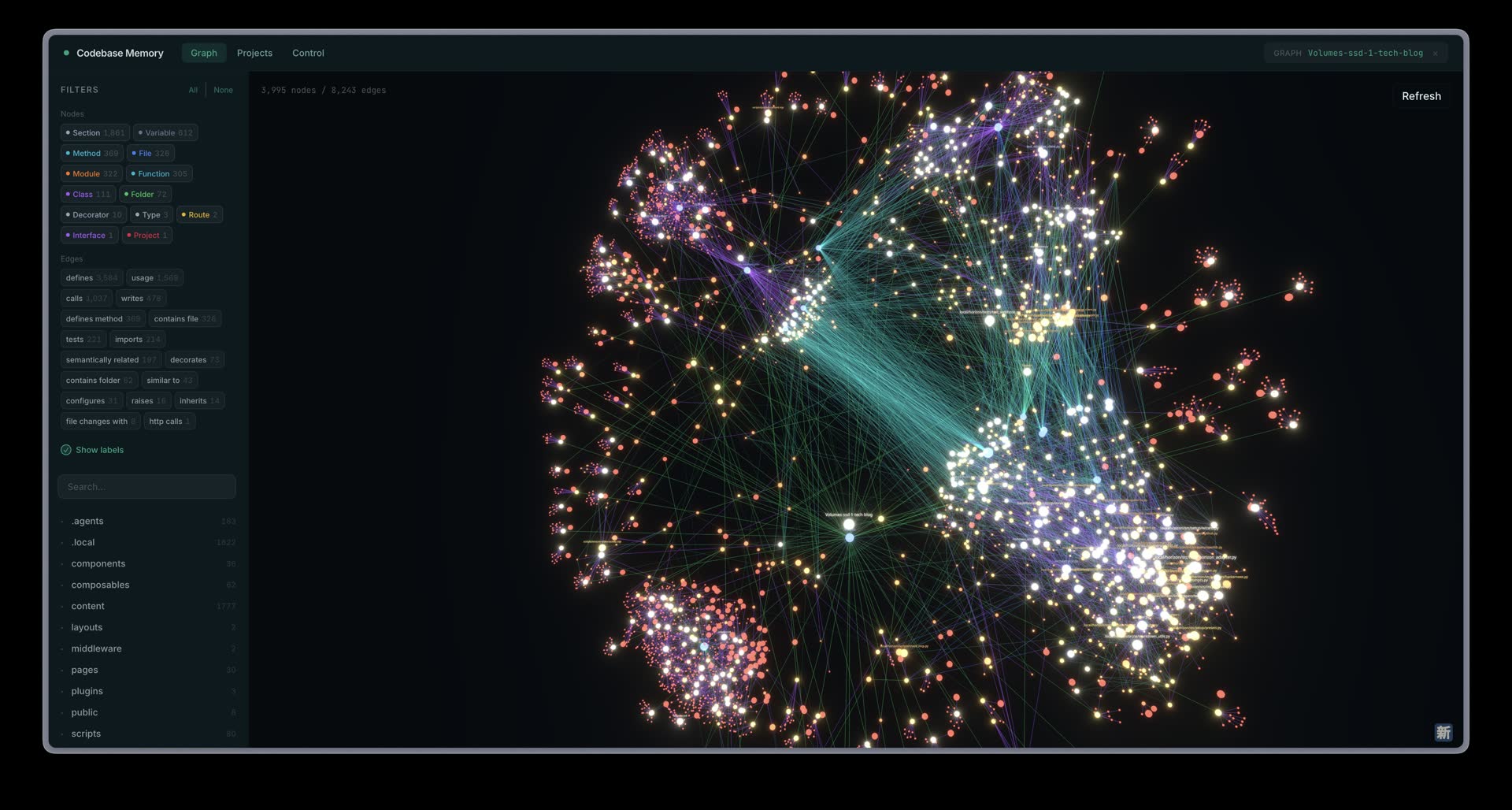
The 3D Graph UI helps you inspect modules, files, and call relationships visually
This view is useful for quickly understanding the overall shape of a repository. You can rotate, zoom, and click nodes to inspect where a module or function sits in the system.
Indexing a Repository
To index a repository manually:
codebase-memory-mcp cli index_repository '{"repo_path":"/path/to/your/repo"}'
For my tech-blog repository, the result was:
{
  "project": "Volumes-ssd-1-tech-blog",
  "status": "indexed",
  "nodes": 3995,
  "edges": 8243
}
The repository contains a mix of Nuxt, Vue, TypeScript, Python scripts, Markdown content, and local agent skills, and it still indexed smoothly.
Querying the Graph with search_graph
After indexing, you can query the graph directly.
For example, I searched for code structures related to twitter webhook blog:
codebase-memory-mcp cli search_graph '{"project":"Volumes-ssd-1-tech-blog","query":"twitter webhook blog","limit":8}'
The result is not plain grep output. It returns structured symbols.
In my test, the top results included:
_expand_twitter_discussionTwitterScraper.fetchTwitterPlaywrightScraper.fetchtest_twitter._tweet
This is exactly the kind of result an agent can use before opening files. It narrows the search space to relevant symbols instead of dumping raw text matches.
Tracing Function Calls with trace_path
The most interesting tool for me is trace_path.
For example, I traced the callers and callees of _expand_twitter_discussion:
codebase-memory-mcp cli trace_path '{"project":"Volumes-ssd-1-tech-blog","function_name":"_expand_twitter_discussion","direction":"both","depth":2,"mode":"calls","include_tests":false}'
It returned both sides of the call graph.
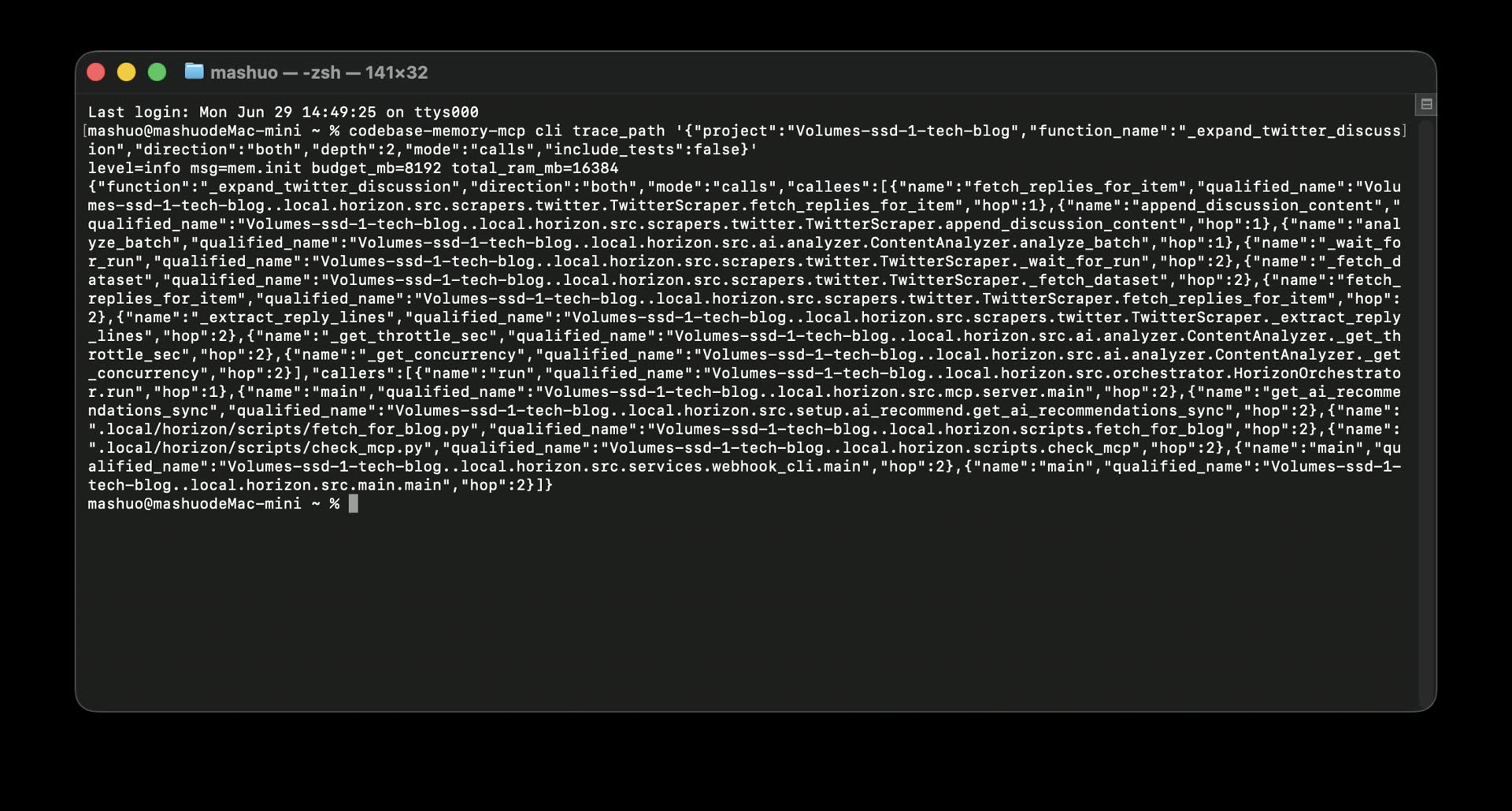
Running trace_path in the terminal shows callers, callees, and hop depth directly
Callers included:
HorizonOrchestrator.runsrc.mcp.server.mainsrc.services.webhook_cli.mainsrc.main.main
Callees included:
TwitterScraper.fetch_replies_for_itemTwitterScraper.append_discussion_contentContentAnalyzer.analyze_batchTwitterScraper._fetch_datasetContentAnalyzer._get_concurrency
This is where the tool becomes genuinely useful.
Often, the hard part is not finding a string. The hard part is understanding where a piece of code sits in the wider system. Codebase Memory MCP turns that into a graph query.
Useful MCP Tools
The project exposes tools such as:
index_repository: index a repositorysearch_graph: search functions, classes, routes, and variablesquery_graph: run Cypher-like graph queriestrace_path: trace calls, data flow, or cross-service pathsget_code_snippet: read source code for a qualified symbolget_graph_schema: inspect graph schemaget_architecture: generate an architecture overviewsearch_code: graph-augmented code searchdetect_changes: map git diffs to affected symbolsmanage_adr: manage Architecture Decision Records
The commands I expect to use most often are:
codebase-memory-mcp cli get_architecture '{"project":"your-project","aspects":["all"]}'
codebase-memory-mcp cli search_graph '{"project":"your-project","query":"auth login token","limit":20}'
codebase-memory-mcp cli trace_path '{"project":"your-project","function_name":"handleLogin","direction":"both","depth":3}'
These are also perfect for AI agents. You can ask the agent to find the login entry point, trace who calls a function, or estimate what a change may affect, and it can use these tools instead of blindly reading files.
Team-Shared Graph Artifact
Codebase Memory MCP also supports a shared graph artifact:
.codebase-memory/graph.db.zst
This is a compressed SQLite graph snapshot.
If your team chooses to commit it, other developers can bootstrap from that artifact instead of rebuilding the full graph from scratch. Then local incremental indexing fills in their own changes.
For large monorepos, that can save a lot of repeated indexing work across the team.
Who Is It For?
I think Codebase Memory MCP is especially useful if:
- You use Claude Code, Codex, Cursor, or another AI coding agent
- Your project is large enough that grep feels insufficient
- You often need to understand unfamiliar codebases
- You trace call chains or blast radius frequently
- You maintain multi-language projects, services, or monorepos
- You want local code intelligence without uploading private source code
For a tiny single-file script, it is probably overkill.
But once a repository has multiple modules, tests, API routes, background jobs, or shared packages, the value becomes obvious.
My Take
At first, I thought this was simply another search tool for agents.
After testing it, I see it more as local codebase memory for AI coding agents.
Without it, an agent often searches, reads a few files, searches again, and reads more files. That costs tokens and can still miss structural relationships.
Codebase Memory MCP flips the workflow: build the graph first, then let the agent query the graph. That feels closer to how a senior engineer explores a system: understand the architecture, follow dependencies, then read the critical code.
The 3D Graph UI also makes it useful for onboarding. Instead of guessing from a folder tree, a new developer can inspect the shape of the repository first and then drill into important nodes.
Conclusion
Codebase Memory MCP is one of the more useful additions I have tried for AI coding agents recently.
It does not replace the agent. It gives the agent a local code intelligence layer.
It turns a repository into a queryable knowledge graph, supports 3D visualization, exposes CLI and MCP tools, can trace calls, summarize architecture, analyze impact, and runs locally.
If you already use Claude Code, Codex, Cursor, or any MCP-compatible coding agent, I recommend trying the UI variant at least once.
Once you see your own repository become a graph that can be queried, inspected, and traced, the value becomes very clear.
Related Links: