

Hands-on with Handy Offline Voice Input: Paired with Breeze ASR 25, a Chinese-English Mixed Input Setup Built for Taiwanese Users
Handy is a free, open-source desktop voice input tool that runs fully offline. In this article, I test installation and configuration on macOS/Windows/Linux, paired with the Breeze ASR 25 model optimized for everyday Chinese-English mixed speech in Taiwan, to build a privacy-focused voice input experience.
Introduction
As a developer or writer, have you ever felt that your typing speed cannot keep up with your thoughts? There are many voice input tools on the market, but most of them rely on cloud APIs. That brings privacy concerns, and they can also lag when the network is unstable.
This time, I want to recommend and test a free, open-source voice input tool called Handy. It supports macOS, Windows, and Linux, and its core feature is that it can be used completely offline. When paired with the Breeze ASR 25 model developed by MediaTek Research, it becomes especially suitable for the everyday Taiwanese speaking style of mixing Mandarin and English.
Here is the demo video from our actual test:
Why Choose Handy?
In an era where ASR tools are everywhere, Handy has a very focused design philosophy: privacy-first, fully offline, real-time input.
Many speech-to-text tools, such as WhisperDesktop or Vibe, are mainly used to transcribe pre-recorded audio files. Handy, however, is positioned as a “voice input method.” You press and hold a custom hotkey, speak, release it, and the recognition is completed. The text is then pasted directly into whatever input field your cursor is currently in, whether that is a browser, Word, LINE, or a terminal.
Because all computation happens on your local computer, even if you are dictating confidential business logic or personal information, you do not need to worry about the data being uploaded to a cloud server.
Pairing It with the Breeze ASR 25 Speech Recognition Model
In the video test, I used breeze-asr-q5_k from the download list. This is the GGUF quantized version, q5_k, of the Breeze ASR 25 model developed by MediaTek Research.
Breeze ASR 25 itself is fine-tuned from OpenAI’s Whisper-large-v2. Compared with the original Whisper model, it has three core advantages that are especially useful for Taiwanese users:
- Better Traditional Chinese recognition: It better matches everyday Taiwanese vocabulary habits and Mandarin accents, greatly reducing the chance of simplified/traditional conversion issues or word-level misrecognition.
- Strong Chinese-English mixed recognition: In Taiwanese speech, Chinese and English often switch within a sentence or between sentences, known as code-switching. The model can capture this more accurately and present mixed Chinese-English phrases in the way they are commonly spoken.
- More accurate timestamp alignment: This is useful for creators who need automatic subtitle generation, because it can produce cleaner subtitle timing.
Besides Breeze ASR, if you want to further improve recognition speed, you can also choose the previously mentioned Whisper Small or Whisper Medium models to get a good balance between responsiveness and accuracy. As for the Parakeet model supported in the official default list, its Chinese support is not ideal, so I would not recommend it for Chinese-language users here.
Installation and Setup
To start using Handy and configure Breeze ASR, you only need the following two simple steps:
Step 1: Change the Interface Language
Go to the official website and download the corresponding version: Handy official website download After downloading and launching Handy, click “關於(About)” in the app. In the first row of the menu, you can change the interface to a language you are familiar with.
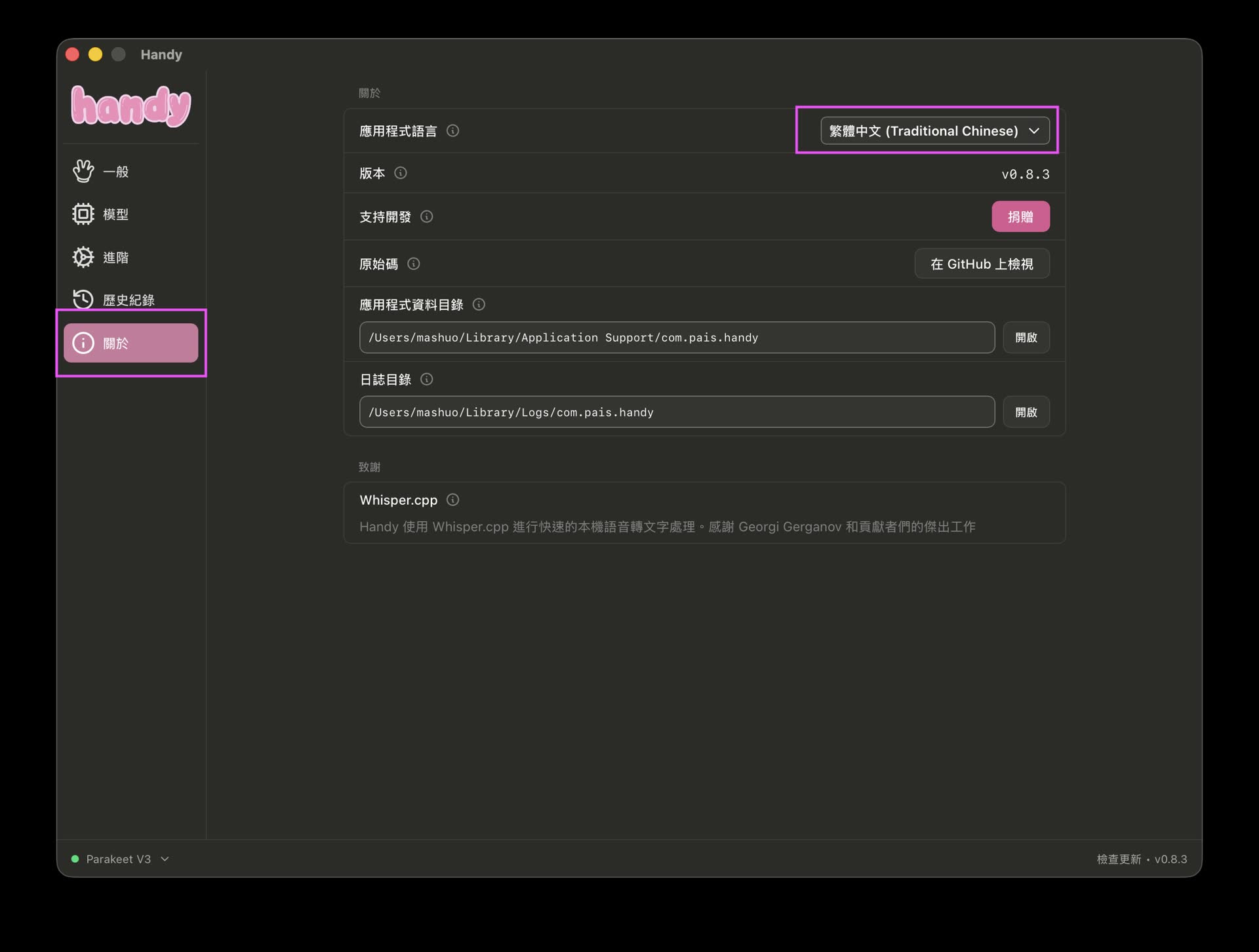
Click About, and you can see that the first row lets you change the app language
Step 2: Download the Speech Recognition Model
Next, go to the model list page. You can click to download the model you need. If you want to use Breeze ASR, choose the Breeze ASR model. If you need another type, you can download a model from the Whisper series.
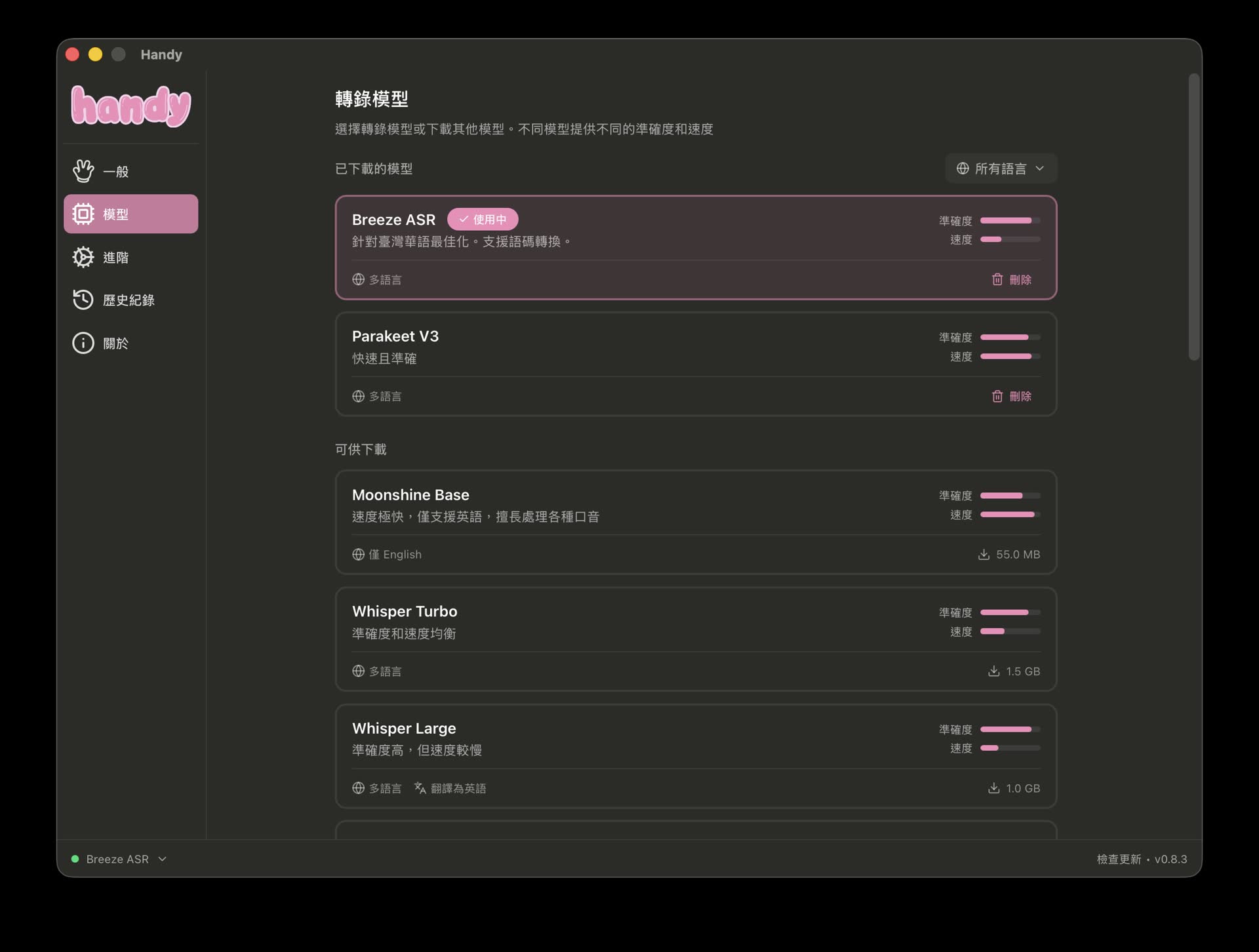
Go to the model list to download models
Usage Notes: Latency and Performance
There is one thing worth paying attention to during actual use. Handy’s pre-save ASR feature can help ensure the completeness of audio clips and the stability of recognition, but its downside is that it is slower and produces around 3 seconds of latency.
This is mainly because the local machine needs some processing time to save the recording, load it, and run inference through the ASR model. If your computer has a higher-end dedicated GPU, the latency will be significantly reduced. But if you are relying only on CPU inference, I recommend choosing a lighter model, such as Whisper Small, to improve smoothness.
Conclusion
Handy does a good job bridging cloud-based voice input and local privacy. It is a very practical productivity tool. Combined with Breeze ASR’s advantage in Chinese-English mixed recognition, it is a strong offline input method option for local developers and writers in Taiwan.
If you are also looking for a voice input tool that does not rely on the internet, keeps data local, and has a high recognition rate, Handy is worth downloading and trying for offline voice input.