

MinerU Hands-on: Open-Source PDF and Multi-Format Document Parsing on macOS/Windows/Linux
When dealing with complex layouts, scanned documents, or formulas, traditional PDF-to-text tools often fall short. The open-source framework MinerU combines layout analysis with vision-language models (VLM) to convert PDFs, images, and Office files into accurate Markdown, tables, and LaTeX formulas in one step. This article tests both the online Web version and local CLI/API deployment workflow.
Introduction: Why Is Document Parsing So Hard?
In everyday development, AI knowledge base construction (RAG systems), and academic research, we often need to extract content from large numbers of PDF papers, scanned documents, and report images. However, document parsing has always been a painful problem, especially when facing these issues:
- Messy layout structure: Multi-column layouts, mixed text and images, headers and footers mixed into the content. Traditional PDF-to-text tools such as PyPDF and pdfplumber often disrupt the reading order.
- Garbled mathematical formulas: Academic papers contain many inline and standalone formulas, which often turn into meaningless garbled text or symbol fragments after conversion.
- Lost tables and images: Tables in reports are hard to preserve completely in structured formats such as Markdown tables or HTML, and images cannot be automatically cropped and linked.
To solve these problems properly, OpenDataLab released MinerU. It is an open-source tool designed for high-accuracy document parsing. It can convert complex PDFs, images, DOCX, PPTX, and XLSX files into Markdown with layout markers, tables, and mathematical formulas, providing high-quality corpus input for large language model pretraining and RAG applications.
Hands-on Result Demo (Live Demo)
MinerU provides a clean and convenient online web version, so we can upload a file and quickly try its parsing capabilities:
Notes From the Web Version Test:
- Multi-format support and fast processing: We can upload PDFs, images, and even Microsoft Office files such as DOCX and PPTX directly in the browser.
- Visual layout feature extraction: The system automatically performs layout analysis, marking body text, headings, images, tables, and formulas with bounding boxes in different colors.
- High-quality Markdown and LaTeX output: The right side renders the converted Markdown result in real time. Mathematical formulas are converted into standard LaTeX syntax, such as
$E=mc^2$, and tables are also organized into clean Markdown tables.
!NOTE Although the web version is extremely convenient, for internal company documents, personal sensitive data, or developers who need batch automation, I recommend using local deployment to protect privacy and make full use of local GPU compute.
Local Deployment and Execution
Running MinerU locally does not give you the graphical interface of the web version, but you get a capable command-line tool (CLI) and API instead, which makes it easy to integrate into automation scripts or RAG workflows.
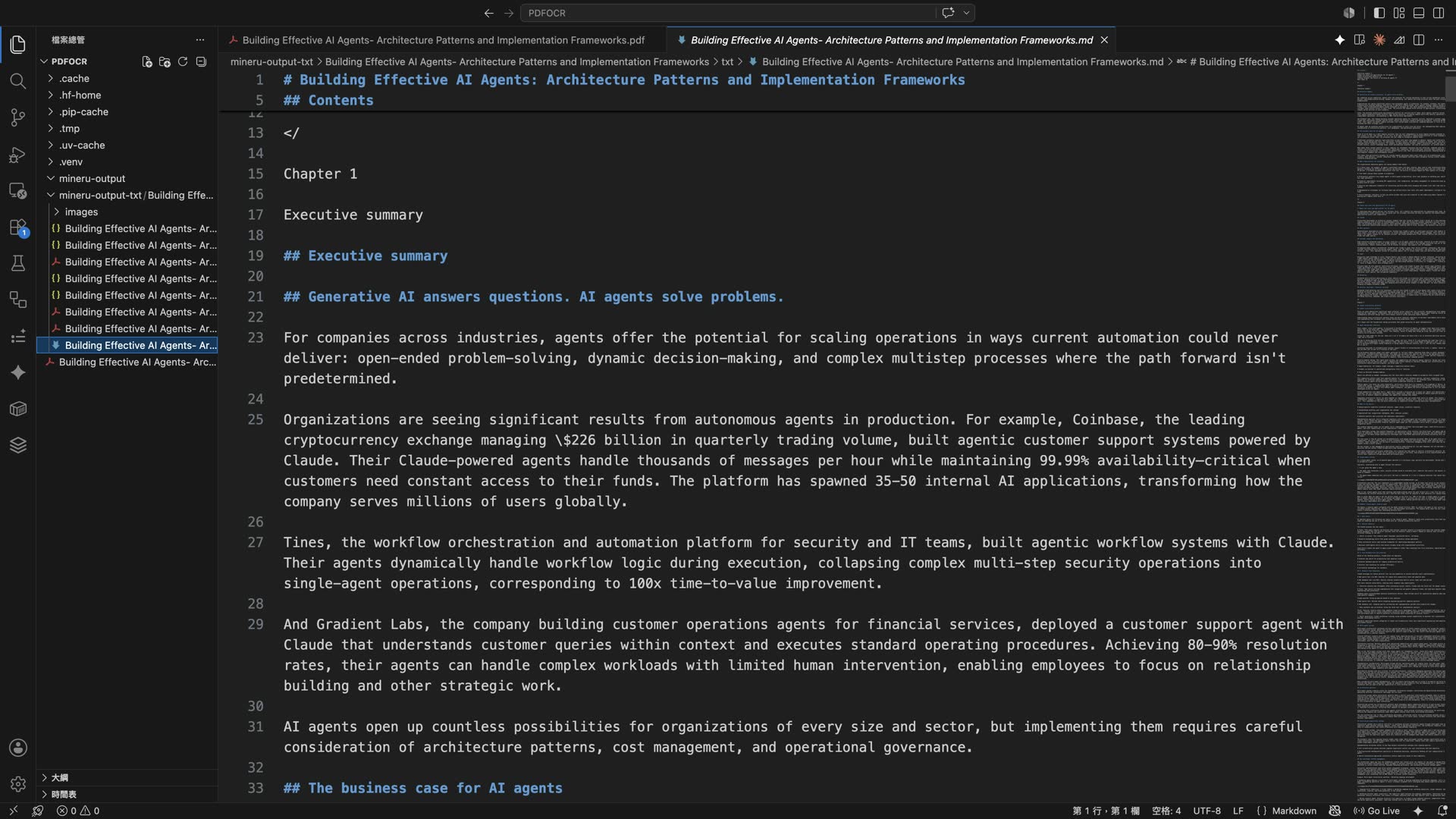
There is no GUI when running locally, but developers can build around it based on their own needs. It is convenient and flexible.
1. Hardware and Environment Requirements
To run MinerU's built-in deep learning models smoothly, your device should meet the following hardware specifications:
| Specification | Hybrid Parsing Mode | VLM Vision-Language Model Mode |
|---|---|---|
| Main Use Case | Balances speed and compatibility (CPU/GPU both supported) | Higher accuracy (for complex handwriting and unusual layouts) |
| Accuracy (OmniDocBench) | 85+ points | 95+ points |
| Operating System | Linux (2019+) / Windows / macOS (14.0+) | Linux (2019+) / Windows / macOS (14.0+) |
| CPU-only Execution | ✅ Supported | ❌ Not supported |
| Minimum GPU Memory (VRAM) | 4GB | 8GB |
| System Memory (RAM) | Minimum 16GB, 32GB+ recommended | Minimum 16GB, 32GB+ recommended |
| Disk Space Requirement | 20GB+ (SSD recommended for storing model files) | 2GB+ (when using an OpenAI-compatible API integration) |
| Python Version | 3.10 ~ 3.13 (Windows does not currently support 3.13) | 3.10 ~ 3.13 |
2. Installation Steps
MinerU provides two local installation methods:
Method 1: Install With pip or uv (Recommended, Fast and Simple)
I recommend using the modern Python package manager uv, which can greatly reduce installation time:
# Make sure pip is up to date
pip install --upgrade pip

# Install the fast package manager uv
pip install uv

# Install the full MinerU version in one step, including all core model dependencies
uv pip install -U "mineru[all]"
!TIP
mineru[all]automatically configures a suitable build for your Windows, Linux, or macOS system. If CUDA acceleration is unavailable after installing on Windows, refer to the official Windows CUDA acceleration guide.
Method 2: Install From Source Code
If you want to try the latest development version or do secondary development, you can clone the project repository and install it:
# Clone the official repository
git clone https://github.com/opendatalab/MinerU.git
cd MinerU

# Install with uv in editable mode
uv pip install -e .[all]
Method 3: Deploy With Docker
If you prefer a clean containerized environment and want to avoid conflicts with your local Python environment, you can use Docker. It only supports Linux and Windows environments with WSL2 enabled. macOS users should not use Docker:
# The official project provides prebuilt Docker images.
# You can go directly to the official documentation for Docker deployment commands.
How to Use MinerU
After installation, you can parse your files from the terminal with the mineru command:
1. GPU-Accelerated Environment (Default)
If your device has a compatible Nvidia GPU or Apple Silicon (M-series chip), run:
mineru -p <input document path> -o <output folder path>
2. CPU-only Environment (pipeline Mode)
If your device does not have a dedicated GPU, you can force it to run in CPU mode:
mineru -p <input document path> -o <output folder path> -b pipeline
!NOTE The
minerucommand is quite smart. The input path-pcan be a single file, such as.png,.docx,.pptx, or.xlsx, or an entire folder. It automatically scans and batch-processes all supported documents in the folder.
Understanding the Two Parsing Backends: Hybrid Mode vs VLM Mode
MinerU's strength comes from its flexible backend architecture. In practical use, you can choose based on your needs:
- Hybrid Mode (Default)
- How it works: Combines a layout analysis model, a formula recognition model, and traditional OCR such as PaddleOCR.
- Advantages: Lower hardware requirements, with a minimum of 4GB VRAM, and supports CPU-only execution. It runs faster and is well suited for batch-processing regular PDF books and papers.
- VLM Vision-Language Model Mode
- How it works: Calls an end-to-end multimodal large model directly, such as a local model deployed through vLLM/LMDeploy or a remote OpenAI-compatible API service.
- Advantages: Accuracy can reach 95+. It has strong recognition and understanding ability for handwriting, highly complex tables, and old scanned documents, making it the better choice when conversion quality matters most.
Summary
MinerU fills a real gap in open-source document parsing and makes converting complex documents into Markdown much less painful. Whether you want to quickly convert PDF papers into Markdown for summarization with GPT/Claude, or prepare clean corpus data for large model training, MinerU is one of the more serious productivity tools currently available for this job.
Related Links:
The open-source project MinerU introduced in this article is released under an open-source license. Feel free to visit its GitHub project page and give it a Star.